Linux Commands Every DevOps Engineer Should Know: A Practical Guide for Beginners
Introduction
Linux is one of the most important technologies in the DevOps ecosystem. From AWS and cloud servers to Docker, Kubernetes, Jenkins, monitoring tools, and CI/CD pipelines, Linux is used extensively behind the scenes.
A DevOps engineer does not need to memorize hundreds of Linux commands. However, understanding the most commonly used commands can make server administration, troubleshooting, automation, and deployment tasks much easier.
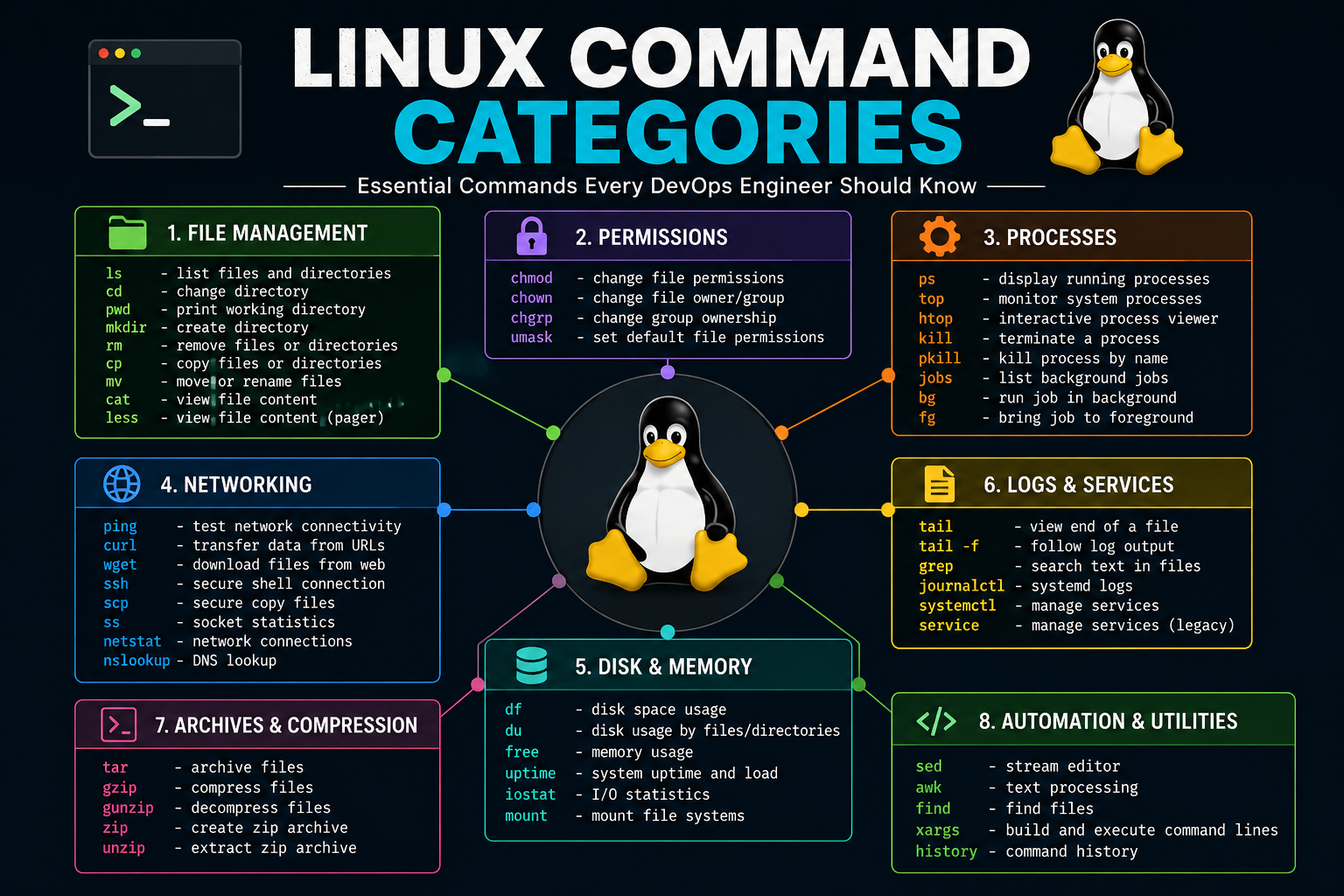
In this guide, we will explore the most important Linux commands that every DevOps engineer should know, along with practical examples.
1. pwd – Check Your Current Directory
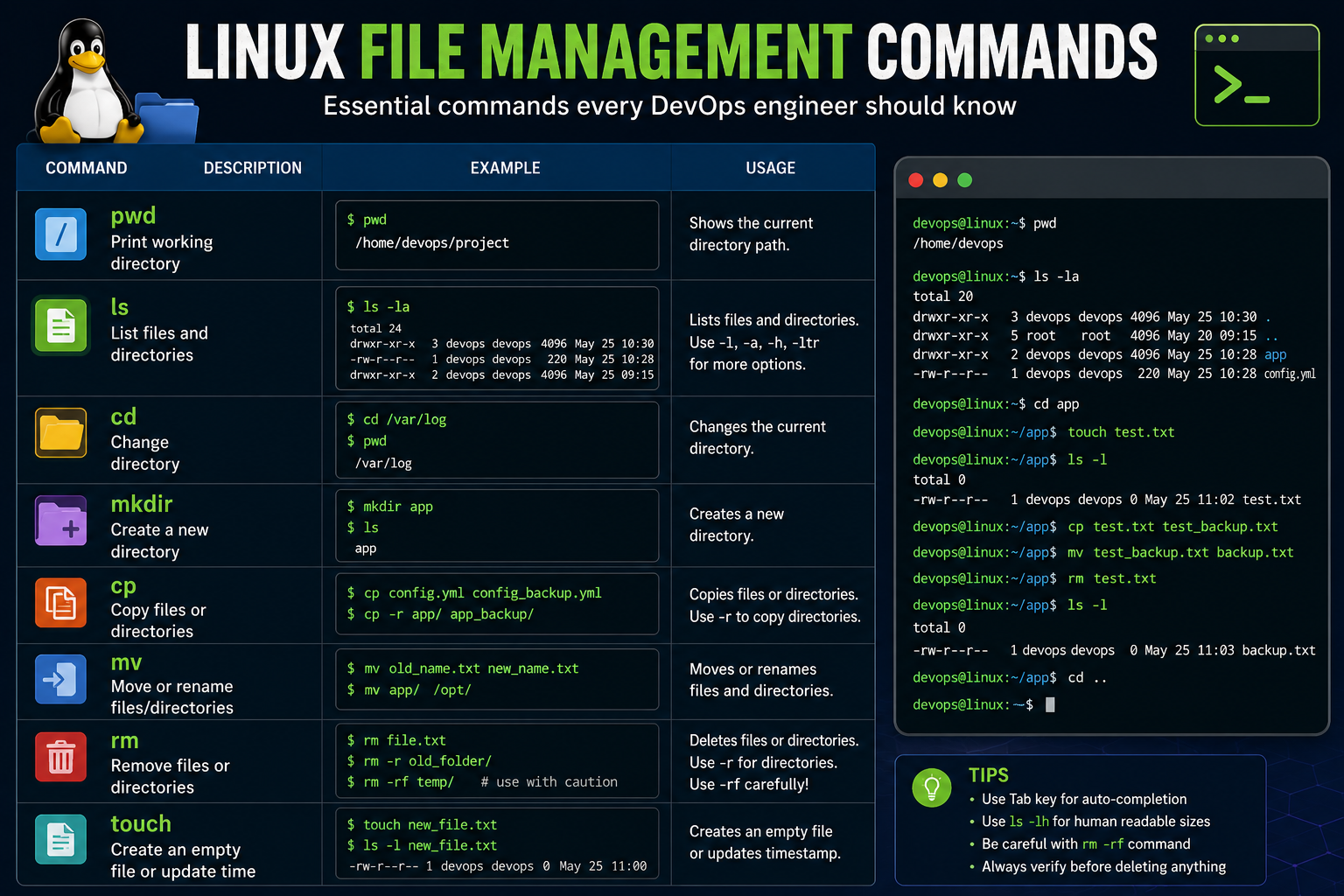
The pwd command displays the absolute path of your current working directory.
pwdExample output:
/home/devopsThis command is especially useful when working with multiple directories on a Linux server.
2. ls – List Files and Directories
The ls command is used to view files and directories.
lsUseful options include:
ls -l
ls -la
ls -lh
ls -ltr- ls -l – Detailed file information
- ls -a – Show hidden files
- ls -h – Human-readable file sizes
- ls -ltr – Sort files by modification time
3. cd – Change Directory
The cd command is used to move between directories.
cd /var/log
cd /etc
cd ..
cd ~
DevOps engineers frequently use cd while navigating application directories, configuration files, logs, and deployment folders.
4. mkdir – Create Directories
The mkdir command creates a new directory.
mkdir projectTo create multiple directories recursively:
mkdir -p project/app/logs5. touch – Create a File
The touch command can create an empty file or update the timestamp of an existing file.
touch application.log6. cp – Copy Files
The cp command copies files and directories.
cp config.txt config_backup.txtTo copy a directory:
cp -r application application_backup7. mv – Move or Rename Files
The mv command is commonly used to move or rename files.
mv old_config.conf new_config.confFor example, during a deployment you may rename an existing configuration file before replacing it with a new version.
8. rm – Remove Files and Directories
The rm command deletes files.
rm test.txtTo remove a directory and its contents:
rm -r old_directoryBe extremely careful with rm -rf because it can permanently delete files and directories without asking for confirmation.
9. cat – View File Contents
The cat command displays the contents of a file.
cat application.confIt is useful for quickly checking configuration files, scripts, and small log files.
10. less – Read Large Files
For large files and logs, less is usually more convenient than cat.
less /var/log/messagesYou can search inside the file using /keyword and navigate through the output without loading the entire file into your terminal at once.
11. head and tail – Check Beginning and End of Files
The head command displays the beginning of a file.
head application.logThe tail command displays the last lines of a file.
tail application.logOne of the most useful commands for DevOps engineers is:
tail -f application.logThis continuously displays new log entries as they are written. It is extremely useful for monitoring application logs during deployments and troubleshooting.
12. grep – Search Text
The grep command searches for specific text inside files or command output.
grep "ERROR" application.logYou can also search recursively:
grep -r "database" /etc/myapp/A common production troubleshooting example is:
grep -i "error" application.logThe -i option performs a case-insensitive search.
13. find – Search for Files
The find command searches for files and directories based on different conditions.
find /var/log -name "*.log"Find files larger than 100 MB:
find / -type f -size +100MThis is particularly useful when troubleshooting disk-space problems.
14. chmod – Change File Permissions
Linux uses permissions to control who can read, write, or execute files. The chmod command changes these permissions.
chmod 755 deploy.shThe commonly used permission values include:
- 7 – Read, write and execute
- 6 – Read and write
- 5 – Read and execute
- 4 – Read only
15. chown – Change File Ownership
The chown command changes the owner and group of a file.
chown devops:devops application.logThis is commonly required when configuring applications, web servers, deployment directories, and service accounts.
16. ps – Check Running Processes
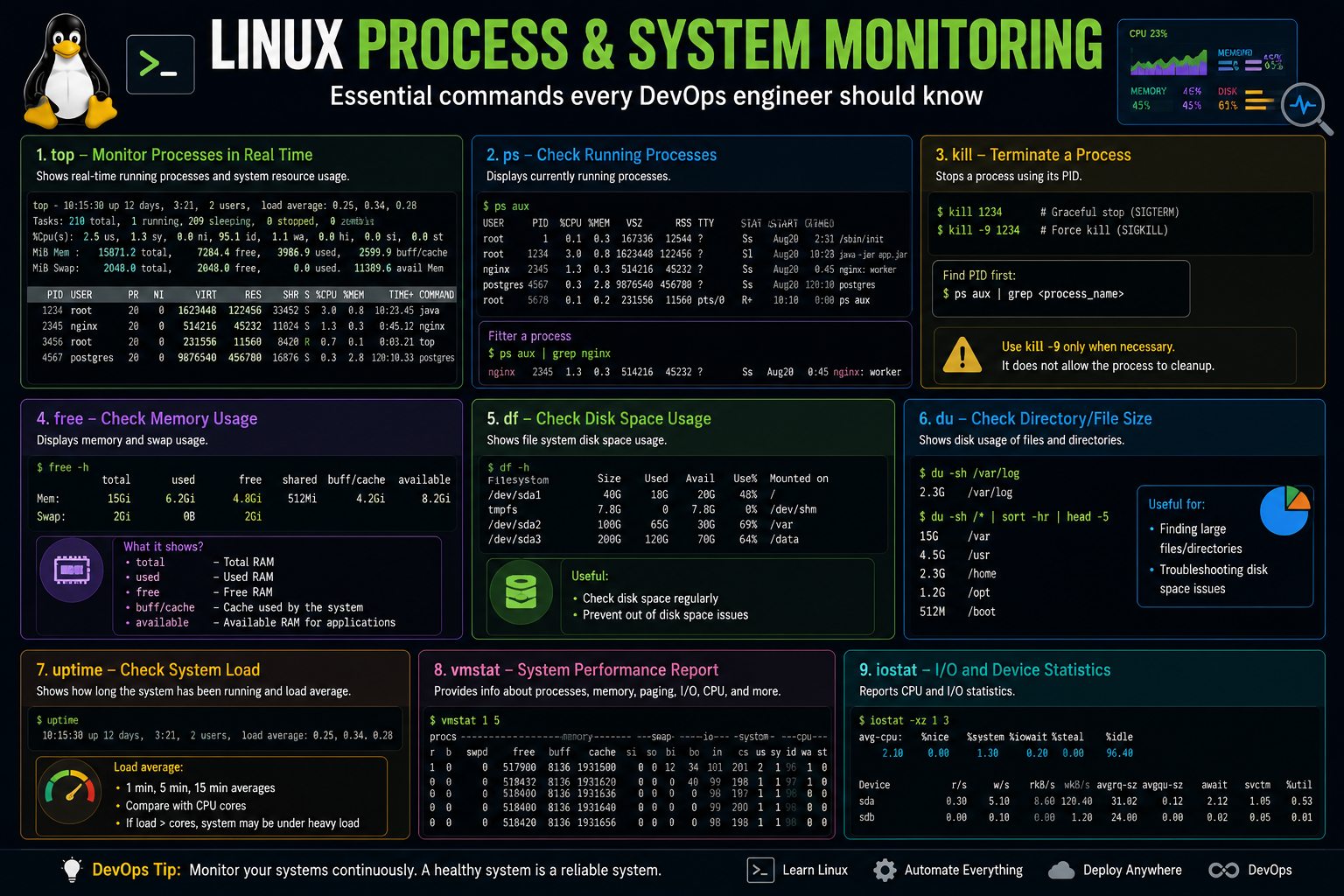
The ps command displays running processes.
ps auxTo search for a particular process:
ps aux | grep nginx17. top – Monitor System Processes
The top command provides a real-time view of running processes and system resource usage.
topIt helps identify processes consuming excessive CPU or memory.
18. kill – Stop a Process
The kill command sends a signal to a process.
kill 12345If a process does not respond, administrators sometimes use:
kill -9 12345Use SIGKILL carefully because the process does not get an opportunity to perform normal cleanup.
19. df – Check Disk Space
The df command displays filesystem disk usage.
df -hThe -h option displays the values in a human-readable format.
This is one of the first commands to use when an application stops working because a server may have run out of disk space.
20. du – Find Disk Usage
The du command helps identify which files or directories are using disk space.
du -sh /var/logTo identify large directories:
du -sh /var/*21. free – Check Memory Usage
The free command displays RAM and swap usage.
free -hThis is useful when an application is experiencing slow performance or processes are being terminated because of memory pressure.
22. uptime – Check Server Load
The uptime command shows how long the system has been running and provides load-average information.
uptime23. systemctl – Manage Services
Modern Linux distributions commonly use systemd to manage services. The systemctl command is used to control them.
systemctl status nginx
systemctl start nginx
systemctl stop nginx
systemctl restart nginx
To enable a service at system startup:
systemctl enable nginx24. journalctl – Check Service Logs
The journalctl command is used to inspect logs collected by systemd's journal.
journalctl -u nginxTo follow new logs:
journalctl -u nginx -f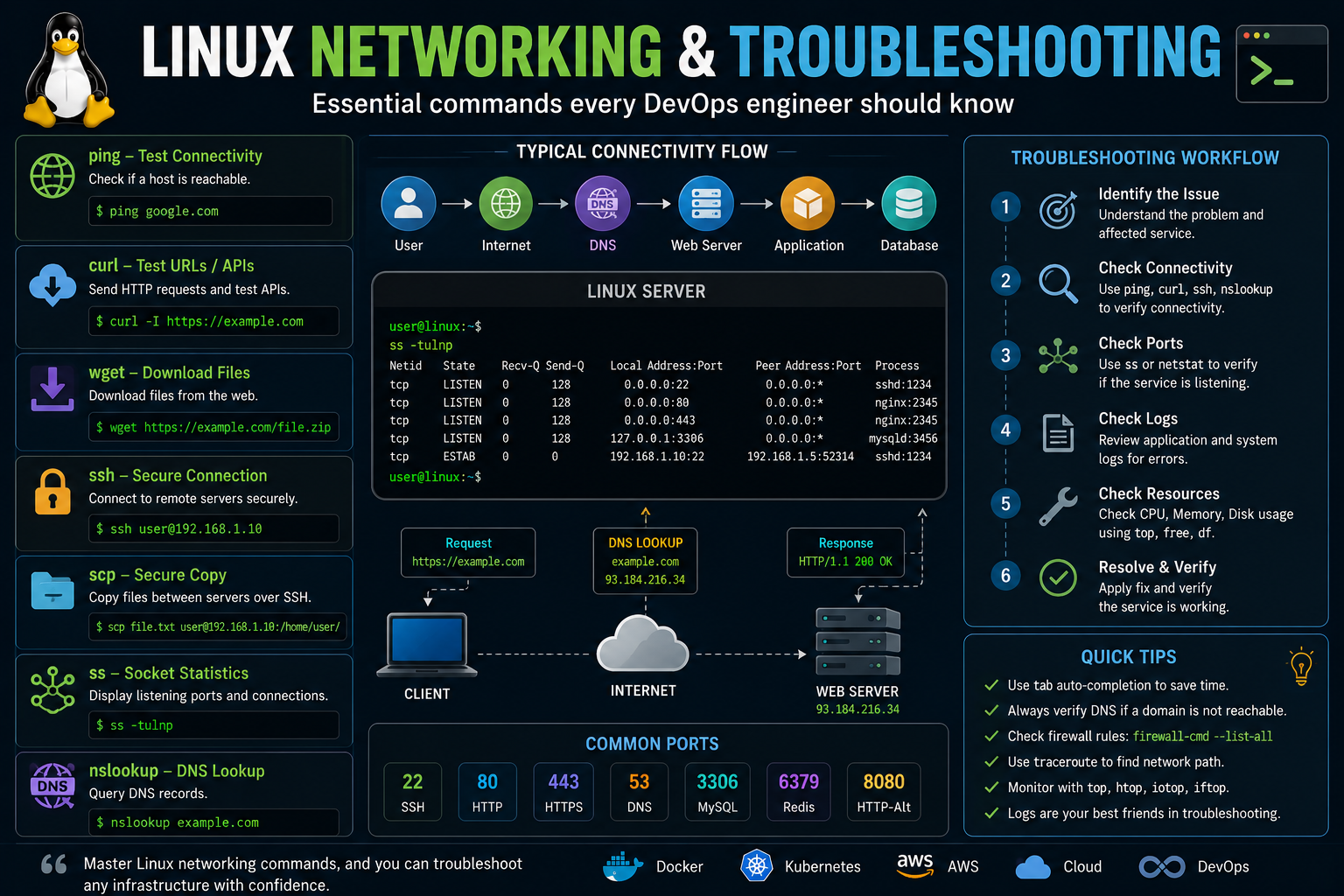
25. curl – Test APIs and URLs
The curl command is extremely useful for DevOps engineers because it can be used to test HTTP endpoints and APIs.
curl https://example.comTo inspect HTTP headers:
curl -I https://example.comYou can also use curl to test application health-check endpoints.
26. ping – Test Network Connectivity
The ping command tests basic network reachability.
ping google.comIt can help determine whether a host is reachable over the network, although a failed ping does not necessarily mean that an application or server is unreachable because ICMP may be blocked.
27. ss – Check Network Connections and Ports
The ss command displays socket and network connection information.
ss -tulnpThis can help identify listening ports and services running on a Linux server.
28. tar – Compress and Extract Files
The tar command is commonly used to create and extract archives.
tar -czvf backup.tar.gz application/To extract the archive:
tar -xzvf backup.tar.gzDevOps engineers commonly use tar for application backups, log archives, and transferring deployment packages.
29. scp – Copy Files Between Servers
The scp command securely copies files between systems over SSH.
scp application.tar.gz user@server:/opt/application/30. ssh – Connect to Remote Servers
SSH is one of the most important tools for Linux and DevOps engineers. It allows you to securely connect to remote servers.
ssh user@192.168.1.100Cloud environments such as AWS EC2 frequently use SSH for administrative access to Linux instances.
31. history – Review Previous Commands
The history command displays previously executed commands.
historyYou can search command history using:
history | grep docker32. sed – Modify Text from the Command Line
The sed command is a powerful stream editor frequently used in automation scripts and deployment pipelines.
For example:
sed 's/old_value/new_value/g' config.txtIt can be used to replace configuration values automatically during deployments.
33. awk – Process Structured Text
The awk command is useful for extracting and processing column-based text data.
awk '{print $1}' users.txtIt becomes particularly useful when processing logs, reports, and command output in shell scripts.
34. sort, uniq and wc
These commands are frequently combined to analyze text and logs.
sort users.txt
sort users.txt | uniq
wc -l users.txt
For example, you can count the number of unique IP addresses in a log file using combinations of commands such as sort, uniq, and awk.
35. Pipes and Redirection
Understanding Linux pipes and redirection is extremely important for DevOps automation.
A pipe sends the output of one command to another command:
ps aux | grep nginxOutput can also be redirected to a file:
command > output.txtTo append output instead of replacing the file:
command >> output.txtLinux Commands Every DevOps Engineer Should Prioritize
If you are a beginner, do not try to memorize every command immediately. Start with the commands that you will use regularly.
- pwd
- ls
- cd
- mkdir
- cp
- mv
- rm
- cat
- less
- grep
- find
- chmod
- chown
- ps
- top
- kill
- df
- du
- free
- systemctl
- journalctl
- curl
- ss
- ssh
- scp
- tar
- sed
- awk
How Linux Skills Help in DevOps
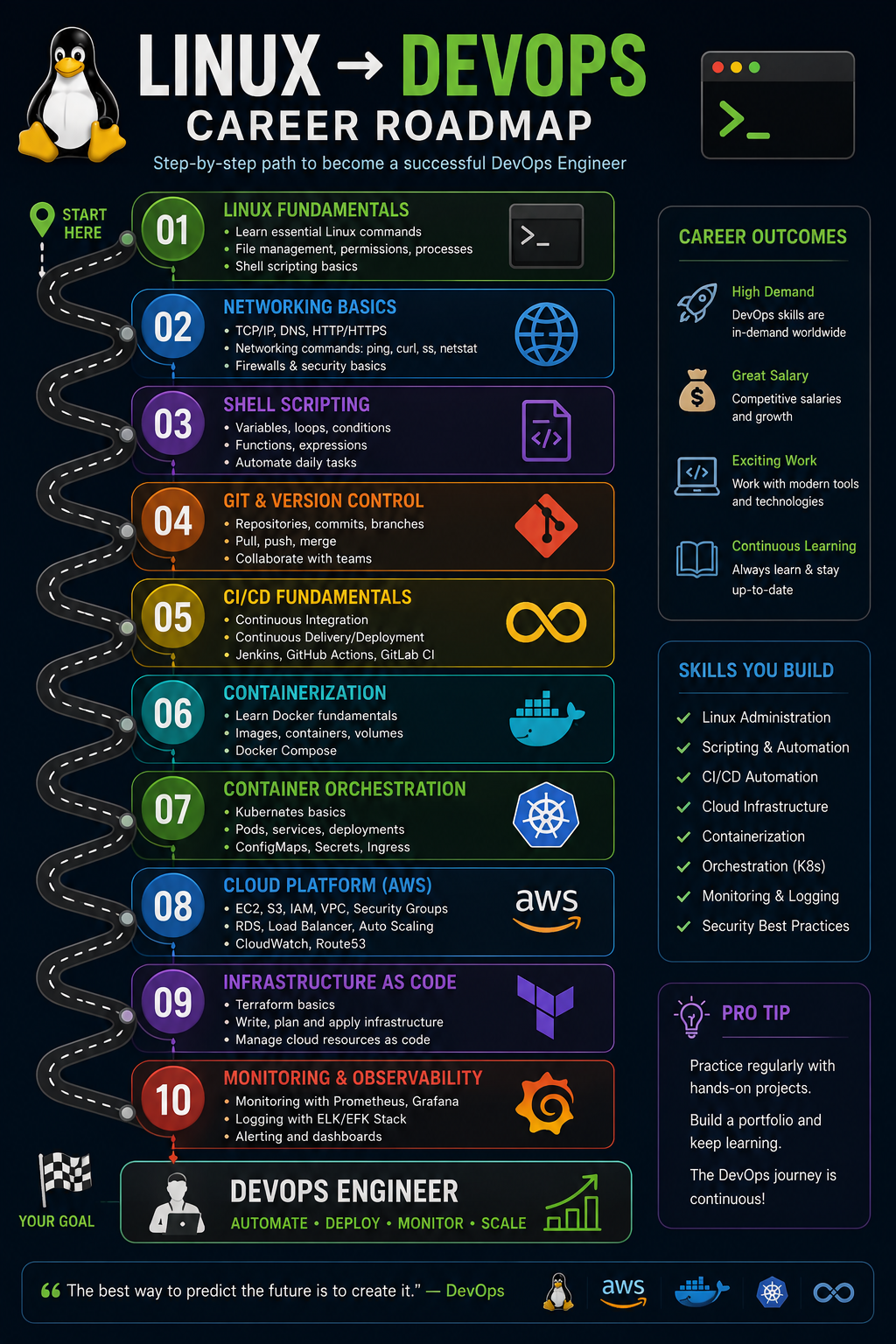
Linux knowledge becomes even more valuable when combined with other DevOps technologies.
- Linux + Git → Source code management
- Linux + Jenkins → CI/CD automation
- Linux + Docker → Container management
- Linux + Kubernetes → Container orchestration
- Linux + AWS → Cloud infrastructure management
- Linux + Terraform → Infrastructure as Code
- Linux + Ansible → Configuration automation
- Linux + Prometheus/Grafana → Monitoring and observability
Final Thoughts
Linux is not just another skill on a DevOps engineer's resume. It is one of the foundations on which many DevOps tools and cloud platforms operate.
The best way to learn Linux is through hands-on practice. Create a Linux virtual machine or cloud instance and practice commands involving files, permissions, processes, networking, services, logs, and troubleshooting.
Once you are comfortable with Linux, move toward Git, shell scripting, CI/CD, Docker, Kubernetes, AWS, Terraform, monitoring, and other DevOps technologies.
Start Your DevOps Journey with BIRD

Want to build practical DevOps skills? At BIRD, you can learn Linux, AWS, Docker, Kubernetes, Jenkins, Terraform, CI/CD, monitoring, and real-world DevOps practices through hands-on training.
Start learning today and build the skills required for a successful DevOps career.