What Is DevOps? Complete Beginner's Guide to DevOps
What Is DevOps?
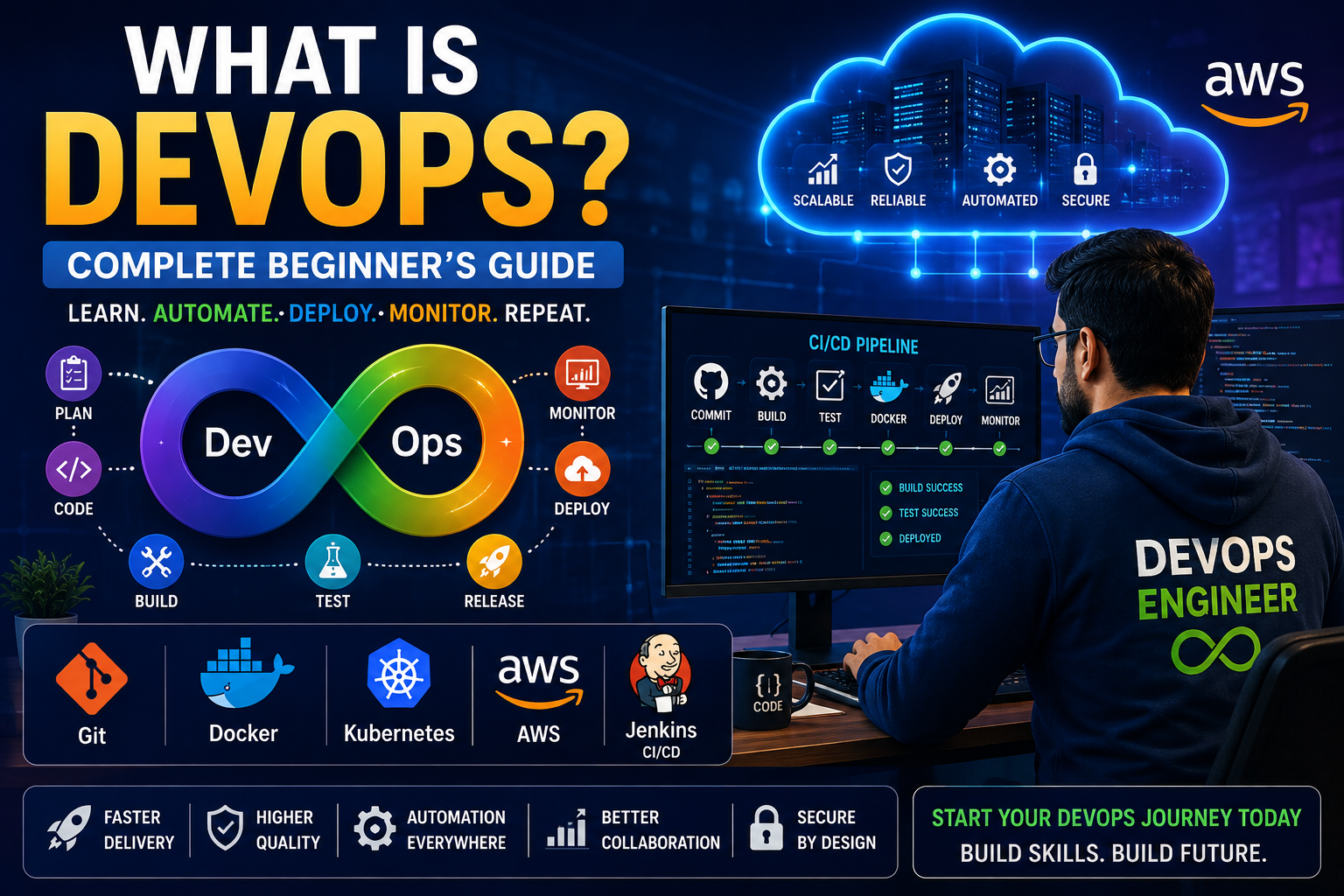
DevOps is a modern software development and IT operations approach that combines people, processes, automation, and technology to build, test, deploy, and maintain software faster and more reliably.
The word DevOps comes from combining Development and Operations. Traditionally, software developers and IT operations teams worked separately. Developers focused on writing application code, while operations teams were responsible for servers, deployments, monitoring, and production systems.
DevOps brings these teams together and uses automation, collaboration, monitoring, and continuous delivery practices to create a faster and more reliable software delivery process.
DevOps Explained in Simple Words
Imagine a company develops an e-commerce application. Developers write the application code, testers check whether it works correctly, and operations teams deploy and maintain the application on servers.
Without DevOps, many of these activities may be performed manually. This can result in slow deployments, configuration errors, communication problems, and difficult troubleshooting.
With DevOps, many of these activities are automated.
- Developers write and manage code using Git.
- Code changes are automatically tested.
- Applications are automatically built.
- Docker can package applications into containers.
- CI/CD tools automate deployment.
- Cloud platforms provide scalable infrastructure.
- Monitoring tools continuously monitor applications and servers.
- Alerts help teams identify problems quickly.
The main objective is to deliver reliable software quickly while continuously improving the development and operations process.
Why Was DevOps Introduced?
Before DevOps became popular, software development and IT operations often worked as separate teams. Developers might complete an application and then hand it over to the operations team for deployment.
This separation could create several problems.
- Communication gaps between development and operations teams.
- Manual deployment processes.
- Long software release cycles.
- Configuration differences between environments.
- Difficult troubleshooting.
- Higher risk of deployment failures.
- Slow feedback from production systems.
DevOps addresses these challenges through collaboration, automation, continuous integration, continuous delivery, infrastructure automation, monitoring, and feedback.
DevOps vs Traditional Software Development
| Traditional Approach | DevOps Approach |
|---|---|
| Development and operations work separately | Development and operations collaborate |
| Manual deployments | Automated deployments |
| Infrequent releases | Frequent releases |
| Manual testing | Automated testing |
| Manual infrastructure configuration | Infrastructure automation |
| Limited monitoring | Continuous monitoring |
| Problems discovered late | Continuous feedback |
How Does DevOps Work?
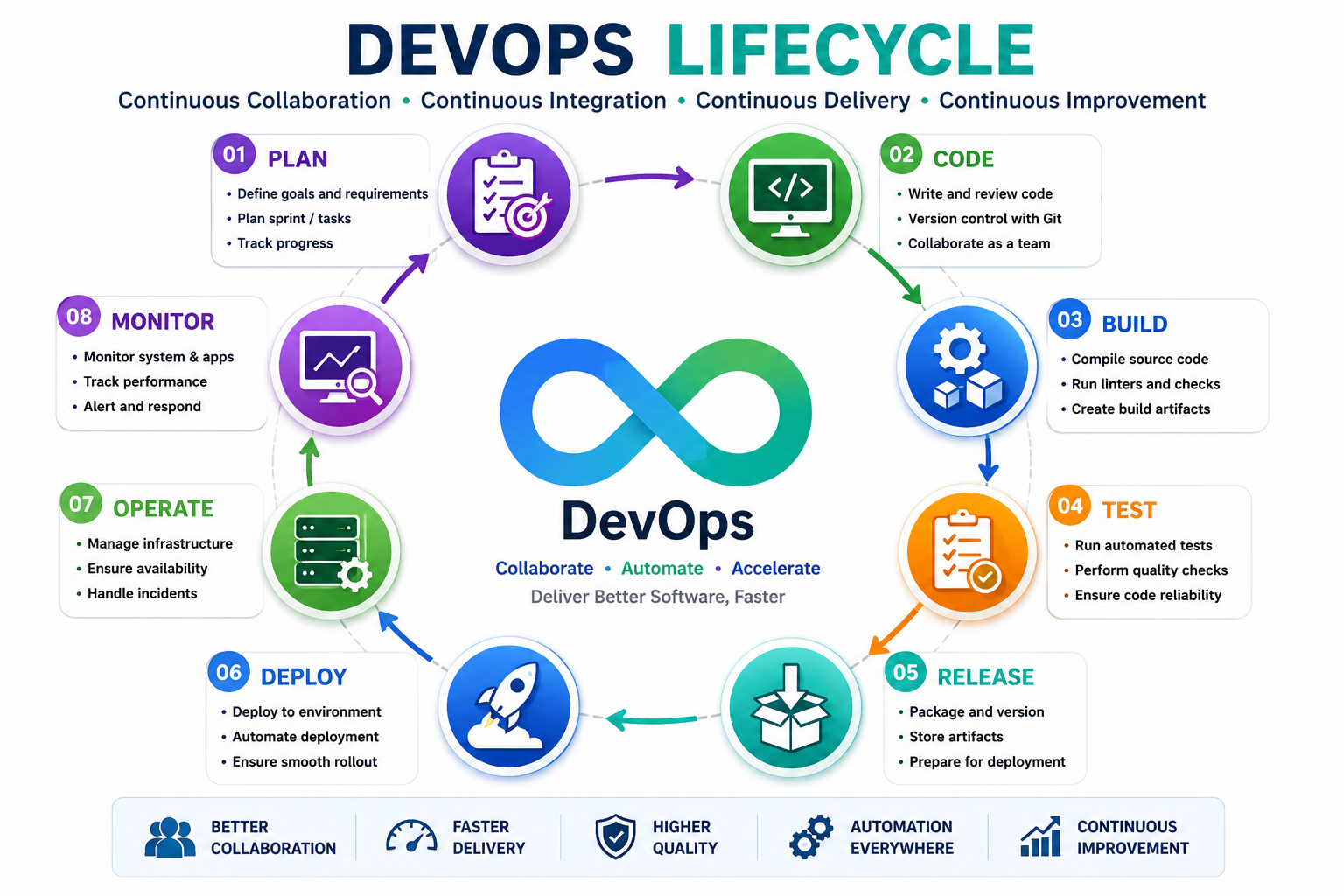
DevOps is not a single tool or technology. It is a combination of practices, processes, automation, and tools that work together throughout the software development lifecycle.
A typical DevOps lifecycle can be represented as:
Plan → Code → Build → Test → Release → Deploy → Operate → Monitor → Feedback
The process is continuous. Feedback from monitoring and production environments can be used to improve the next development cycle.
DevOps Lifecycle
1. Plan
The process begins with planning. Development teams identify business requirements, application features, bugs, improvements, and technical tasks.
Popular project management tools include Jira, Azure Boards, and similar collaboration platforms.
2. Code
Developers write application code and maintain it using version control systems. Git is one of the most widely used version control systems in modern DevOps environments.
Git allows developers to track changes, create branches, merge code, and collaborate with other developers.
3. Build
The source code is compiled, packaged, or prepared for deployment during the build stage.
Build automation tools depend on the programming language and application technology. Examples include Maven, Gradle, npm, and similar build systems.
4. Test
Automated testing helps identify problems before an application reaches production.
- Unit testing
- Integration testing
- Functional testing
- API testing
- Security testing
5. Release
After successful testing, the application version can be prepared for release. CI/CD platforms can automate many release activities.
6. Deploy
The application is deployed to development, testing, staging, or production environments.
Deployment can be automated using tools such as Jenkins, GitHub Actions, GitLab CI/CD, Argo CD, and cloud deployment services.
7. Operate
After deployment, the application and infrastructure need to be maintained. DevOps engineers work with servers, containers, cloud resources, networking, security, databases, and application environments.
8. Monitor
Monitoring provides visibility into application and infrastructure health. Teams monitor CPU usage, memory, disk usage, network traffic, application performance, logs, errors, and availability.
Popular monitoring and observability tools include Prometheus, Grafana, ELK Stack, OpenSearch, and cloud monitoring services.
Important DevOps Tools
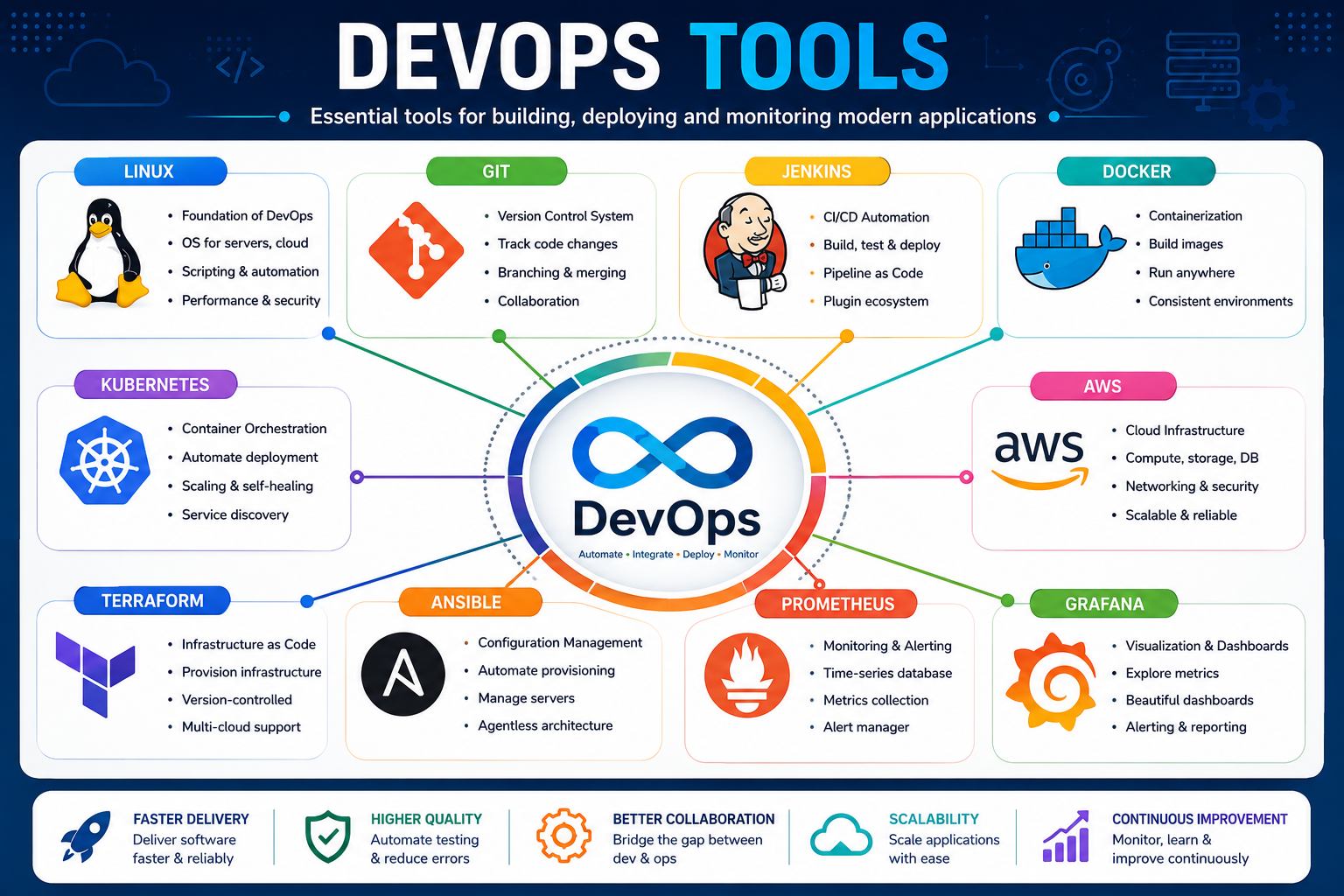
A DevOps Engineer does not need to learn every available tool. However, understanding the major categories and learning commonly used tools is important.
| Category | Popular Tools |
|---|---|
| Operating System | Linux |
| Version Control | Git, GitHub, GitLab |
| CI/CD | Jenkins, GitHub Actions, GitLab CI/CD |
| Containers | Docker |
| Container Orchestration | Kubernetes |
| Infrastructure as Code | Terraform |
| Configuration Management | Ansible |
| Cloud | AWS, Azure, Google Cloud |
| Monitoring | Prometheus, Grafana |
| Logging | ELK Stack, OpenSearch |
What Is CI/CD?
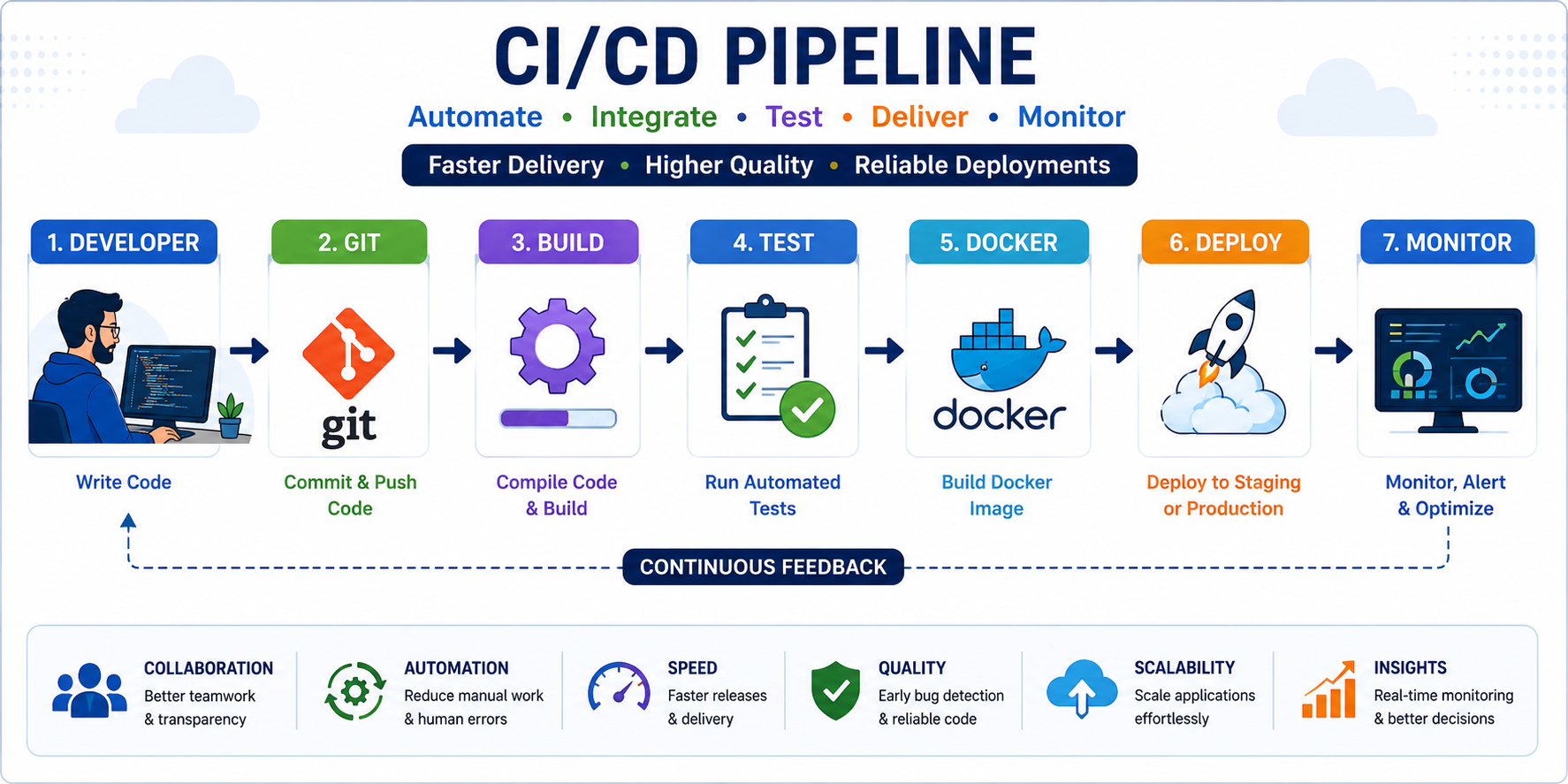
CI/CD is one of the most important concepts in DevOps.
CI stands for Continuous Integration. It means developers frequently integrate code changes into a shared repository, where automated build and testing processes can validate those changes.
CD commonly refers to Continuous Delivery or Continuous Deployment. It focuses on automatically preparing and delivering software changes through deployment environments.
A simple CI/CD pipeline may look like this:
Developer → Git → Build → Test → Docker Image → Deployment → Monitoring
What Is Docker?
Docker is a containerization platform that packages an application together with the dependencies required to run it.
Containers help create more consistent application environments across development, testing, and production.
For example, instead of manually installing an application's dependencies on every server, a Docker image can contain the application and its required runtime environment.
Important Docker concepts include:
- Docker Image
- Docker Container
- Dockerfile
- Docker Registry
- Docker Compose
- Container Networking
- Container Volumes
What Is Kubernetes?
Kubernetes is a container orchestration platform used to deploy, manage, scale, and operate containerized applications.
When an organization runs many containers across multiple servers, manually managing those containers can become difficult. Kubernetes provides automation for many container management tasks.
Important Kubernetes concepts include:
- Pod
- Deployment
- Service
- Namespace
- ConfigMap
- Secret
- Ingress
- Persistent Volume
- ReplicaSet
- Kubernetes Cluster
Why Linux Is Important for DevOps
Linux is one of the most important foundations for a DevOps career because a large number of servers, cloud workloads, containers, and infrastructure systems use Linux.
A beginner should become comfortable with commands such as:
- ls
- cd
- pwd
- mkdir
- cp
- mv
- rm
- grep
- find
- sed
- awk
- ps
- top
- df
- du
- chmod
- chown
- systemctl
- curl
- ssh
Linux administration, shell scripting, processes, networking, permissions, logs, services, and troubleshooting are valuable skills for DevOps Engineers.
Why Git Is Important in DevOps
Git provides version control for source code and configuration files. It allows teams to maintain a history of changes and collaborate safely.
Important Git commands include:
- git init
- git clone
- git status
- git add
- git commit
- git push
- git pull
- git branch
- git checkout
- git merge
- git log
A DevOps Engineer should understand branches, pull requests, merging, conflict resolution, tags, and repository workflows.
Why Cloud Computing Is Important for DevOps
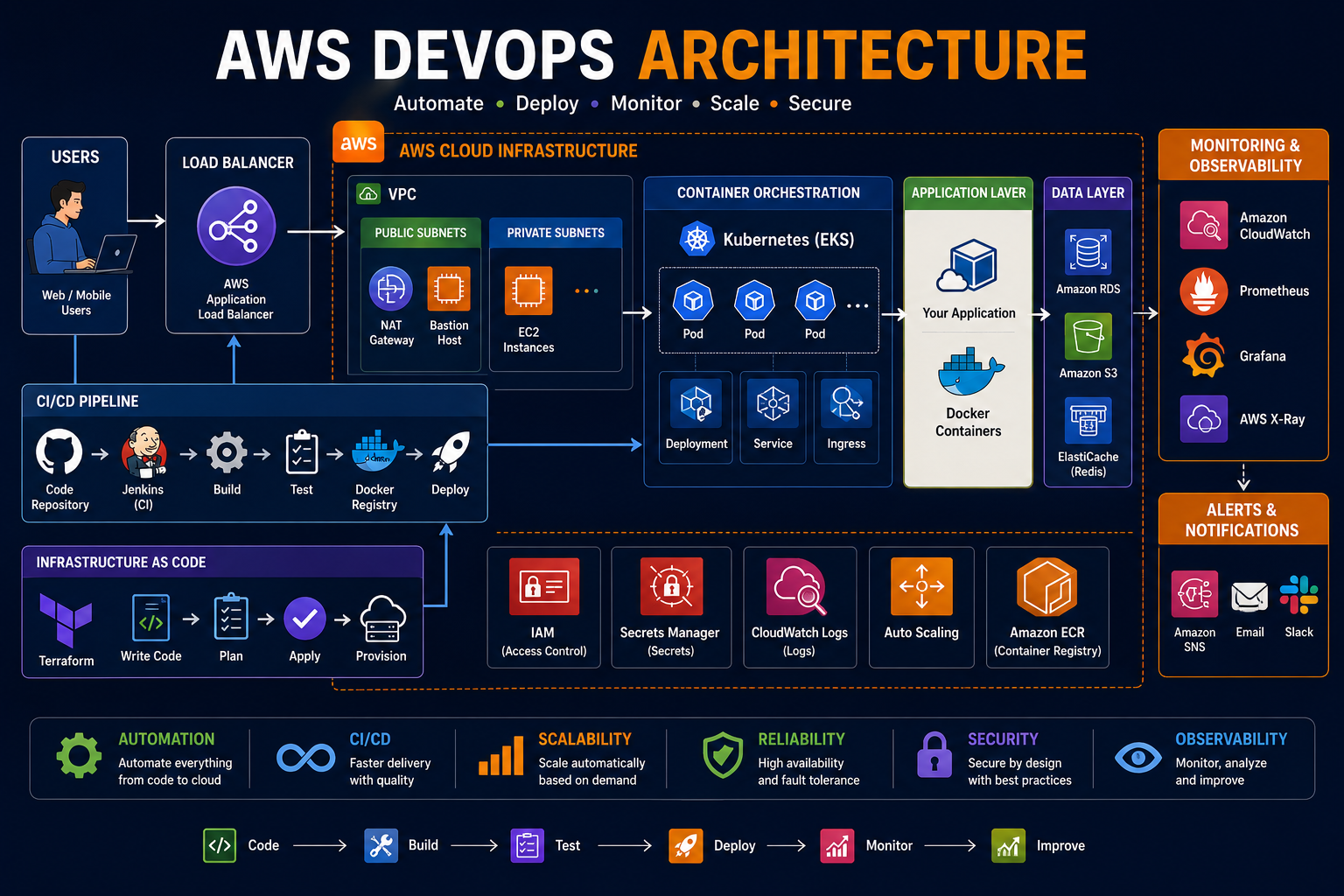
Modern applications frequently use cloud infrastructure because cloud platforms provide on-demand computing, networking, storage, databases, security services, monitoring, and automation capabilities.
Popular cloud platforms include:
- Amazon Web Services (AWS)
- Microsoft Azure
- Google Cloud
For beginners, AWS is a popular starting point for learning cloud concepts. Important services to understand include compute, storage, networking, identity and access management, databases, load balancing, auto scaling, containers, and monitoring.
What Does a DevOps Engineer Do?
A DevOps Engineer helps development and operations teams build reliable, automated, and scalable software delivery environments.
Typical responsibilities may include:
- Managing Linux servers.
- Maintaining Git repositories.
- Building CI/CD pipelines.
- Automating deployments.
- Creating Docker images.
- Managing Kubernetes environments.
- Managing cloud infrastructure.
- Writing infrastructure as code.
- Configuring monitoring and alerts.
- Troubleshooting production issues.
- Improving application reliability.
- Automating repetitive operational tasks.
DevOps Engineer Skills Roadmap for Beginners
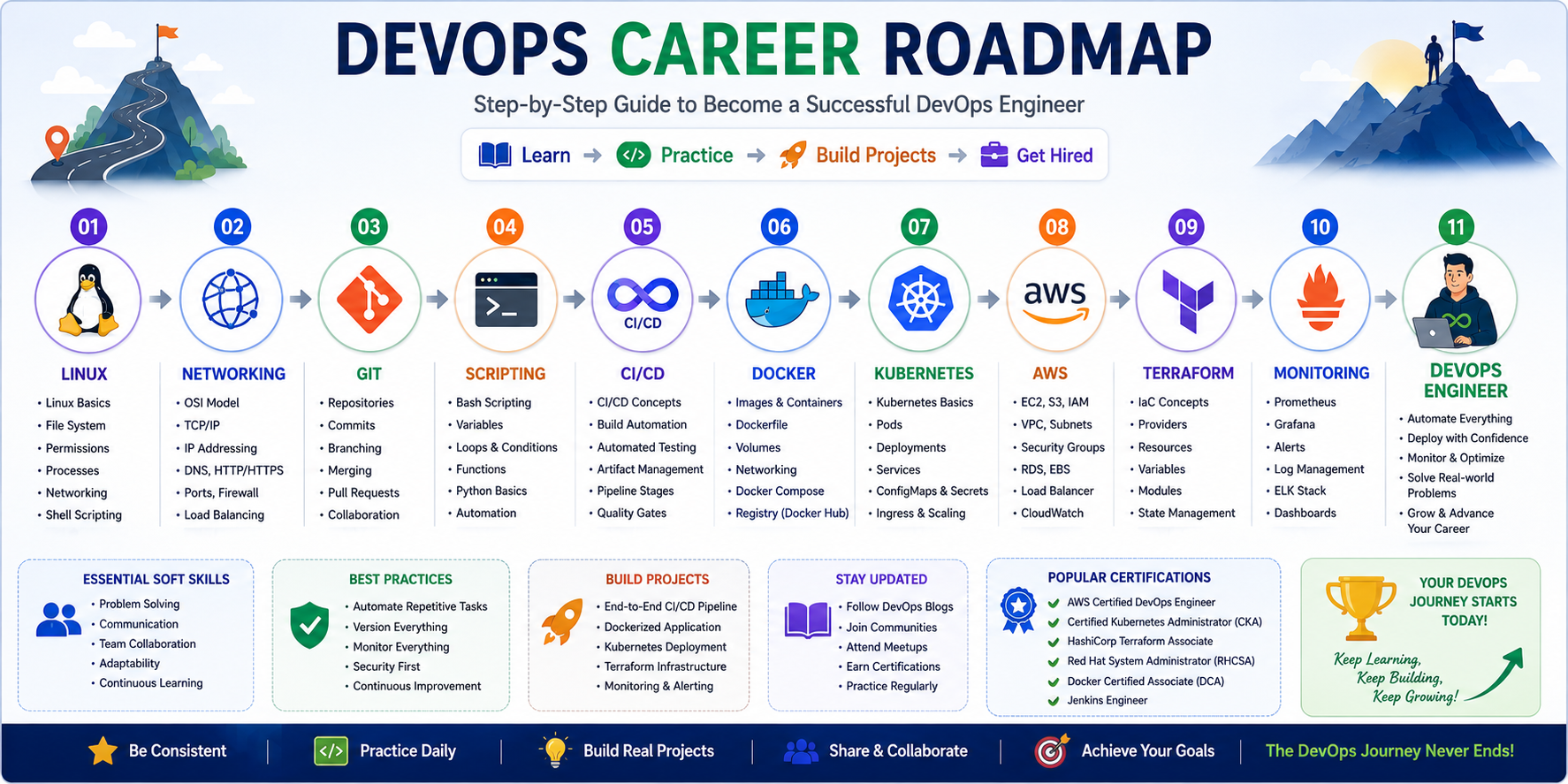
If you are starting from zero, avoid trying to learn every DevOps tool at the same time. Build your knowledge step by step.
- Linux Fundamentals – Learn commands, permissions, processes, services, networking, and shell scripting.
- Networking Basics – Understand IP addresses, DNS, HTTP/HTTPS, ports, TCP/IP, SSH, firewalls, and load balancing.
- Git & GitHub – Learn repositories, branches, commits, pull requests, merging, and collaboration.
- Scripting – Learn Bash and basic Python for automation.
- CI/CD – Learn Jenkins, GitHub Actions, or another CI/CD platform.
- Docker – Learn images, containers, Dockerfiles, volumes, networking, and registries.
- Kubernetes – Learn pods, deployments, services, namespaces, ingress, configuration, and scaling.
- Cloud Computing – Learn AWS, Azure, or Google Cloud fundamentals.
- Infrastructure as Code – Learn Terraform and understand infrastructure automation.
- Configuration Management – Learn Ansible and configuration automation.
- Monitoring & Logging – Learn Prometheus, Grafana, logs, alerts, and observability.
- DevSecOps – Learn the basics of security scanning, secrets management, vulnerability management, and secure CI/CD.
DevOps Tools Learning Order
A practical learning sequence for beginners can be:
Linux → Networking → Git → Bash → Python → Jenkins → Docker → Kubernetes → AWS → Terraform → Ansible → Prometheus → Grafana
The exact tools used by companies vary, so focus on understanding the underlying concepts rather than memorizing commands for a single tool.
Real-World DevOps Project Example
One of the best ways to learn DevOps is by building a complete project.
For example, you can create a simple web application and implement the following workflow:
- Developer writes application code.
- Code is pushed to GitHub.
- A CI/CD pipeline is triggered.
- The application is tested automatically.
- A Docker image is created.
- The image is pushed to a container registry.
- The application is deployed to Kubernetes or a cloud environment.
- Terraform manages the infrastructure.
- Prometheus collects metrics.
- Grafana displays monitoring dashboards.
- Alerts notify the team when problems occur.
Building projects like this helps beginners understand how individual DevOps technologies work together in a real environment.
Is DevOps Difficult for Beginners?
DevOps can seem difficult initially because it covers multiple areas including Linux, networking, programming, cloud computing, automation, containers, deployment, and monitoring.
However, beginners do not need to learn everything at once.
The best approach is to learn one foundation at a time and continuously practice with hands-on projects.
For example:
- Start with Linux.
- Learn basic networking.
- Learn Git.
- Practice Bash scripting.
- Build your first CI/CD pipeline.
- Containerize an application using Docker.
- Deploy the application using Kubernetes.
- Move the infrastructure to AWS.
- Automate infrastructure using Terraform.
- Add monitoring using Prometheus and Grafana.
DevOps Career Opportunities
DevOps knowledge can lead to several technology roles depending on your skills and experience.
- DevOps Engineer
- Cloud Engineer
- Site Reliability Engineer
- Platform Engineer
- Cloud DevOps Engineer
- Infrastructure Engineer
- Automation Engineer
- Release Engineer
- DevSecOps Engineer
- Cloud Architect
Common DevOps Interview Topics
Candidates preparing for DevOps interviews should be comfortable explaining both concepts and practical scenarios.
- What is DevOps?
- What is CI/CD?
- What is Git?
- What is Docker?
- What is Kubernetes?
- What is Infrastructure as Code?
- What is Terraform?
- What is Jenkins?
- What is a Docker image?
- What is a Kubernetes Pod?
- What is a Kubernetes Service?
- How does a CI/CD pipeline work?
- How would you troubleshoot a failed deployment?
- How would you monitor a production application?
- How do you secure secrets in a CI/CD pipeline?
DevOps vs Cloud Engineer
| DevOps Engineer | Cloud Engineer |
|---|---|
| Focuses heavily on software delivery and automation | Focuses heavily on cloud infrastructure |
| CI/CD and deployment automation | Cloud architecture and infrastructure |
| Docker and Kubernetes | Cloud networking and services |
| Monitoring and operational automation | Cloud security and scalability |
| Infrastructure as Code | Infrastructure as Code |
There is significant overlap between these careers. Many DevOps Engineers work extensively with cloud platforms, while Cloud Engineers may also use DevOps automation practices.
Benefits of Learning DevOps
- Strong demand for automation skills.
- Opportunities across many industries.
- Exposure to cloud technologies.
- Strong foundation for SRE and Platform Engineering.
- Opportunities to work with modern infrastructure.
- Useful combination of development and operations skills.
- Ability to automate repetitive technical tasks.
- Strong career growth potential with experience.
Final Thoughts
DevOps is much more than learning Jenkins, Docker, Kubernetes, or AWS. It is a combination of collaboration, automation, continuous delivery, infrastructure management, monitoring, security, and continuous improvement.
For beginners, the most important thing is to build strong fundamentals before moving to advanced tools. Start with Linux and networking, learn Git and scripting, understand CI/CD, then move into Docker, Kubernetes, cloud, Infrastructure as Code, monitoring, and security.
Most importantly, focus on hands-on practice. Building and troubleshooting real projects will help you understand DevOps much better than simply watching tutorials or memorizing commands.
Start Your DevOps Journey with BIRD
If you want to build a career in DevOps, practical training can help you learn the technologies in the correct sequence and gain experience through real-world projects.
At BIRD – Blackhawk Institute of Research & Development, students can learn technologies such as Linux, Git, DevOps, AWS, Docker, Kubernetes, CI/CD, Terraform, monitoring, and automation through a practical, project-oriented approach.
Ready to start your DevOps journey?
Explore DevOps training and build the skills required for modern cloud and DevOps careers.