Docker vs Kubernetes Explained: Key Differences, Use Cases, and When to Use Each
Docker vs Kubernetes Explained: Key Differences, Use Cases, and When to Use Each
Docker and Kubernetes are two of the most important technologies used in modern DevOps and cloud environments. If you are starting your journey in DevOps, cloud computing, SRE, or containerization, you will frequently hear about both Docker and Kubernetes.
But are Docker and Kubernetes competitors? Not exactly.
Docker is primarily used to build, package, and run applications inside containers, while Kubernetes is used to manage and orchestrate containers across multiple machines.
In this guide, we will explain Docker vs Kubernetes in simple terms, understand how they work, compare their features, and see how they can work together in a real-world DevOps environment.
What Is Docker?
Docker is a containerization platform that allows developers and administrators to package an application together with its dependencies and run it consistently across different environments.
A Docker container contains the application and the components required to run it. This helps reduce the common problem of an application working on one machine but failing on another because of differences in software versions or configuration.
For example, suppose a Python application requires Python 3.12 and several specific libraries. Instead of manually installing everything on every server, you can package the application and its dependencies into a Docker image and run it as a container.
Simple Docker Workflow
- Write application code.
- Create a Dockerfile.
- Build a Docker image.
- Store the image in a container registry.
- Run the image as a Docker container.
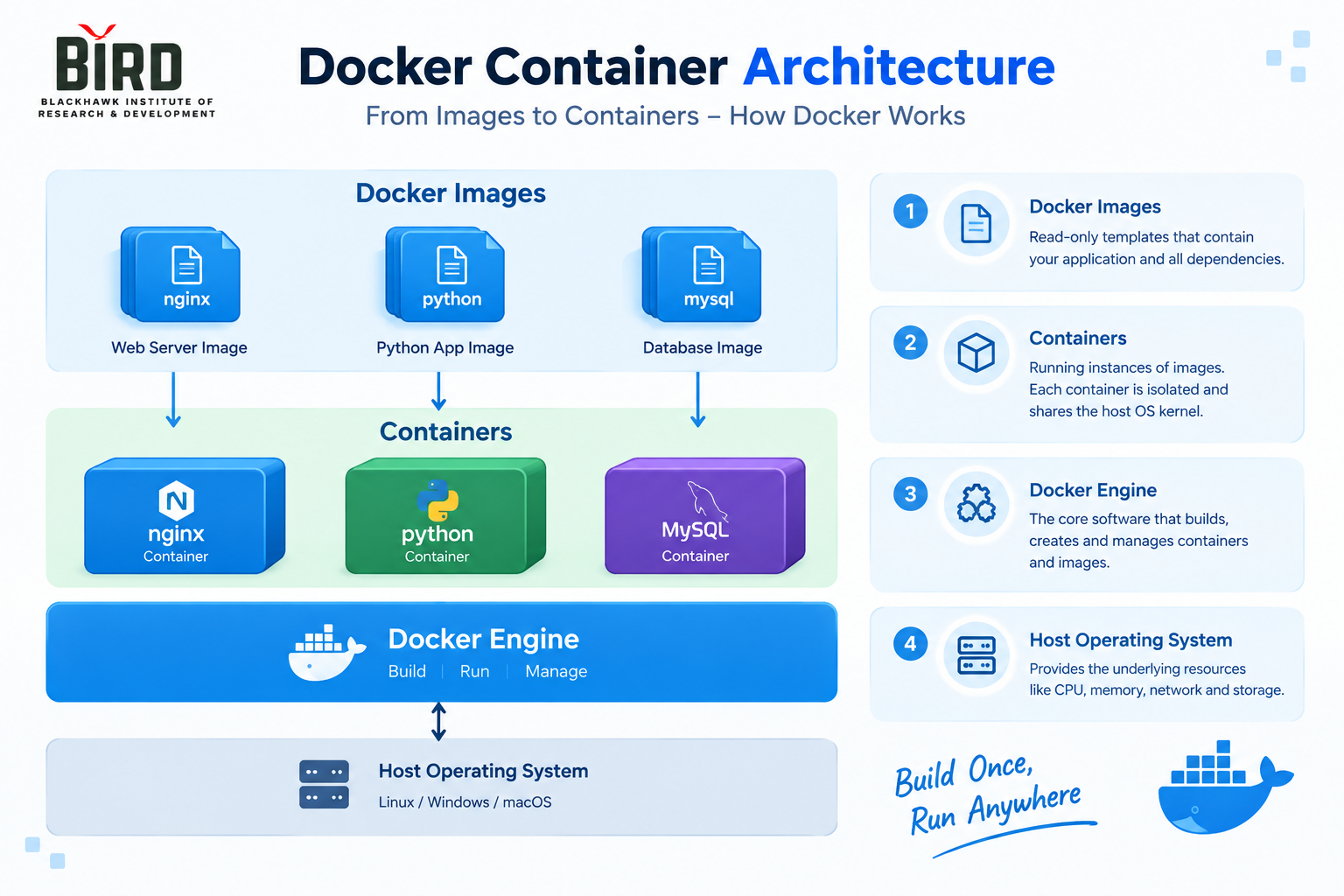
Important Docker Concepts
Before understanding Docker vs Kubernetes, it is important to know a few basic Docker concepts.
Docker Image
A Docker image is a packaged, read-only template containing the application, dependencies, libraries, and configuration required to create a container.
Docker Container
A container is a running instance of a Docker image. Containers are isolated from each other while sharing the host operating system's kernel.
Dockerfile
A Dockerfile is a text file containing instructions used to build a Docker image.
For example:
FROM nginx:latest
COPY index.html /usr/share/nginx/html/
EXPOSE 80
This example starts with an NGINX image and copies an application file into the web server's document directory.
Docker Registry
A container registry stores and distributes container images. Developers can push images to a registry and servers can pull those images when they are required.
What Is Kubernetes?
Kubernetes, often abbreviated as K8s, is an open-source container orchestration platform designed to automate the deployment, scaling, networking, and management of containerized applications.
Running one or two containers manually is relatively simple. The problem becomes more complicated when an application has hundreds or thousands of containers running across multiple servers.
This is where Kubernetes becomes useful.
Kubernetes can help manage containerized workloads by providing capabilities such as:
- Container deployment
- Scaling applications
- Service discovery
- Load balancing
- Rolling updates
- Self-healing
- Scheduling workloads
- Configuration and secret management
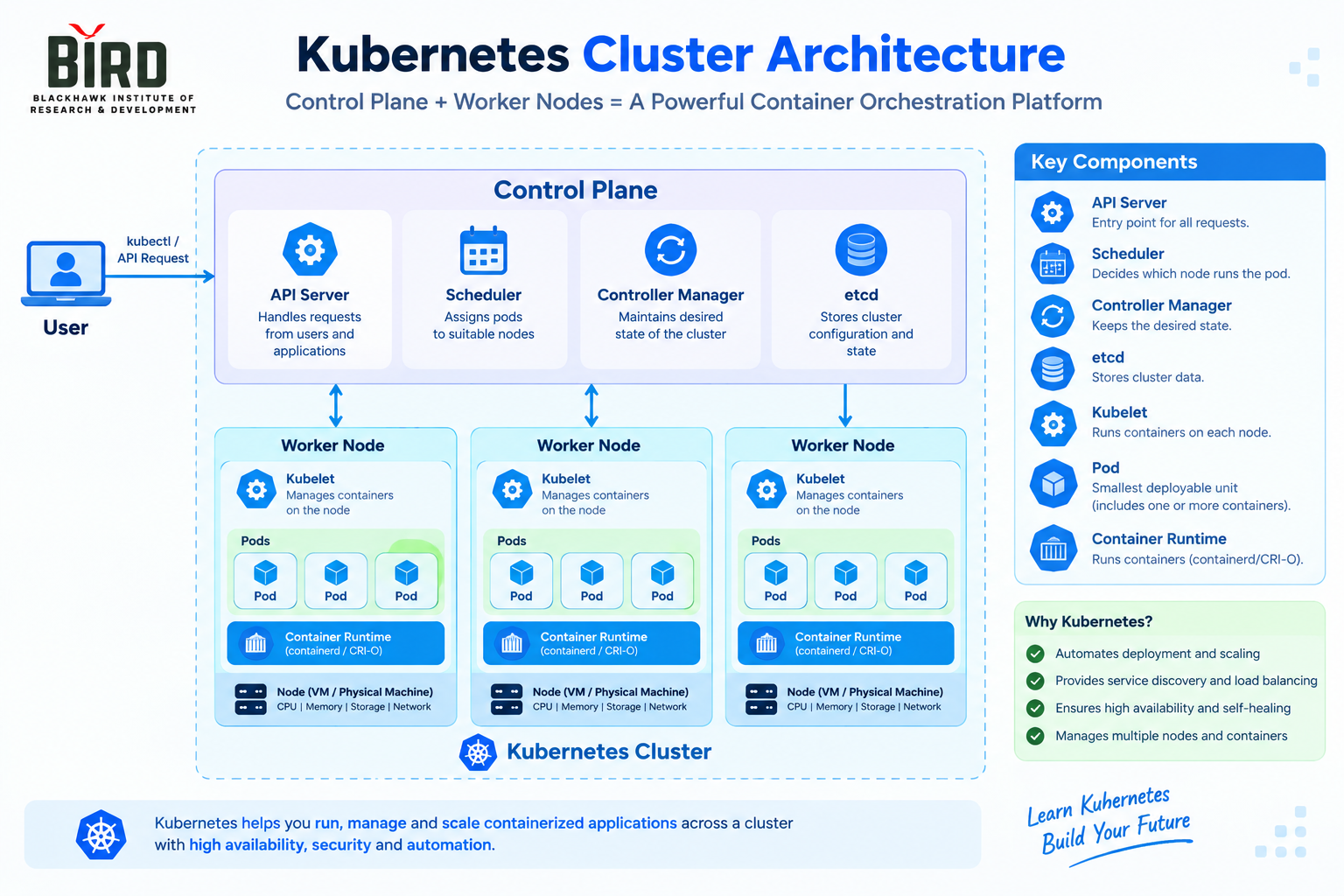
Important Kubernetes Concepts
Cluster
A Kubernetes cluster is a group of machines used to run containerized workloads.
Node
A node is a machine that participates in the Kubernetes cluster and runs workloads assigned to it.
Pod
A Pod is the smallest deployable unit in Kubernetes. A Pod can contain one or more containers that share networking and storage resources.
Deployment
A Kubernetes Deployment describes the desired state of an application and helps Kubernetes maintain the required number of running Pod replicas.
Service
A Kubernetes Service provides a stable way to access a group of Pods and enables service discovery within a cluster.
Docker vs Kubernetes: The Basic Difference
The simplest way to understand the difference is:
Docker runs and packages containers.
Kubernetes manages containerized applications at scale.
Docker is primarily concerned with container creation and execution, while Kubernetes focuses on coordinating workloads across a cluster.
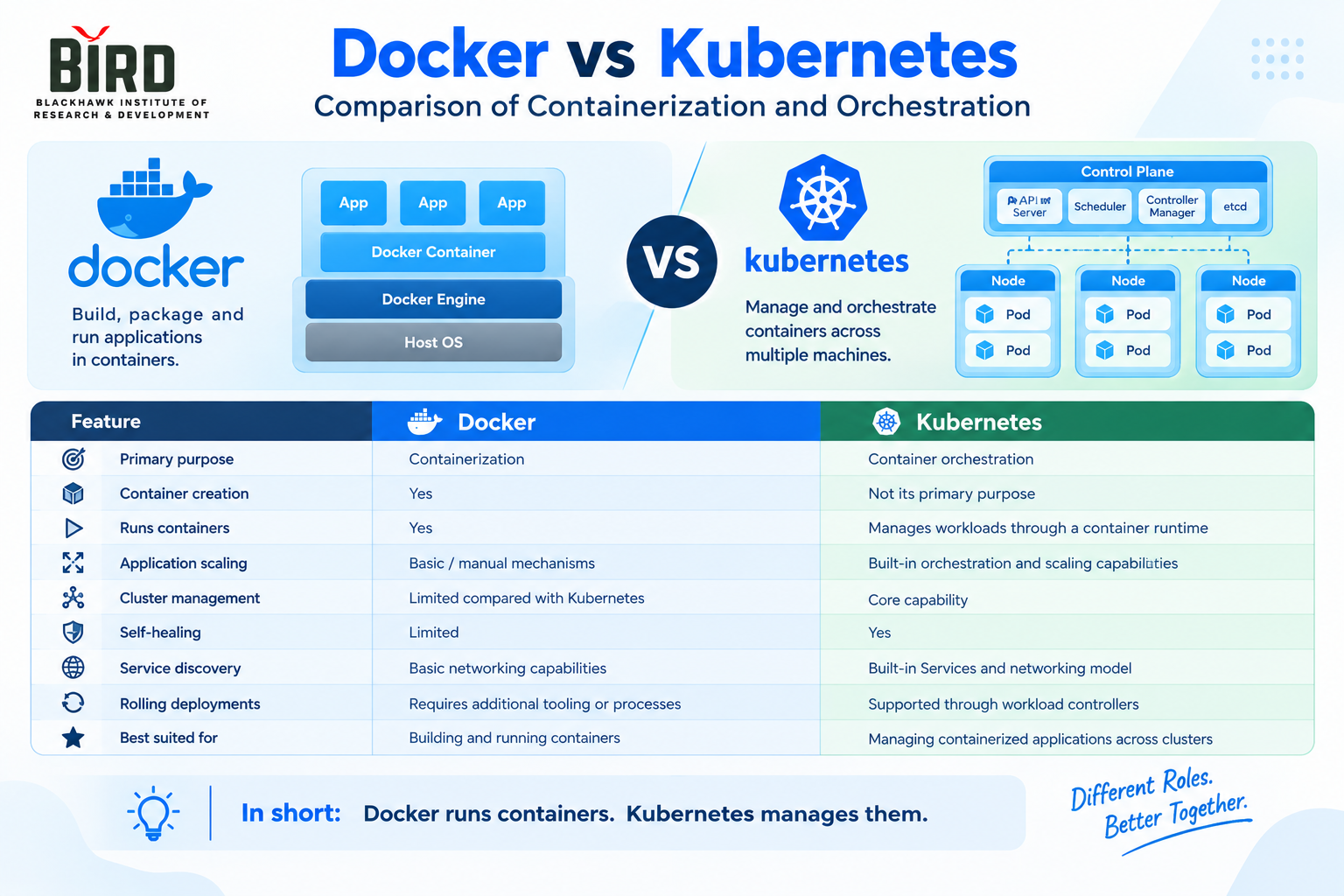
Docker vs Kubernetes Comparison
| Feature | Docker | Kubernetes |
|---|---|---|
| Primary purpose | Containerization | Container orchestration |
| Container creation | Yes | Not its primary purpose |
| Runs containers | Yes | Manages workloads through a container runtime |
| Application scaling | Basic/manual mechanisms | Built-in orchestration and scaling capabilities |
| Cluster management | Limited compared with Kubernetes | Core capability |
| Self-healing | Limited | Yes |
| Service discovery | Basic networking capabilities | Built-in Kubernetes Services and networking model |
| Rolling deployments | Requires additional tooling or processes | Supported through Kubernetes workload controllers |
| Best suited for | Building and running containers | Managing containerized applications across clusters |
Are Docker and Kubernetes Competitors?
This is one of the most common questions asked by beginners.
The answer depends on which Docker technology or workflow you are referring to, but conceptually, Docker and Kubernetes address different layers of the container ecosystem.
Docker provides tools for building and running containers, while Kubernetes provides an orchestration layer for managing containerized workloads across a cluster.
Modern Kubernetes environments commonly use container runtimes that implement the Kubernetes Container Runtime Interface (CRI). Docker's underlying container technology has also influenced the broader container ecosystem.
Can Docker and Kubernetes Work Together?
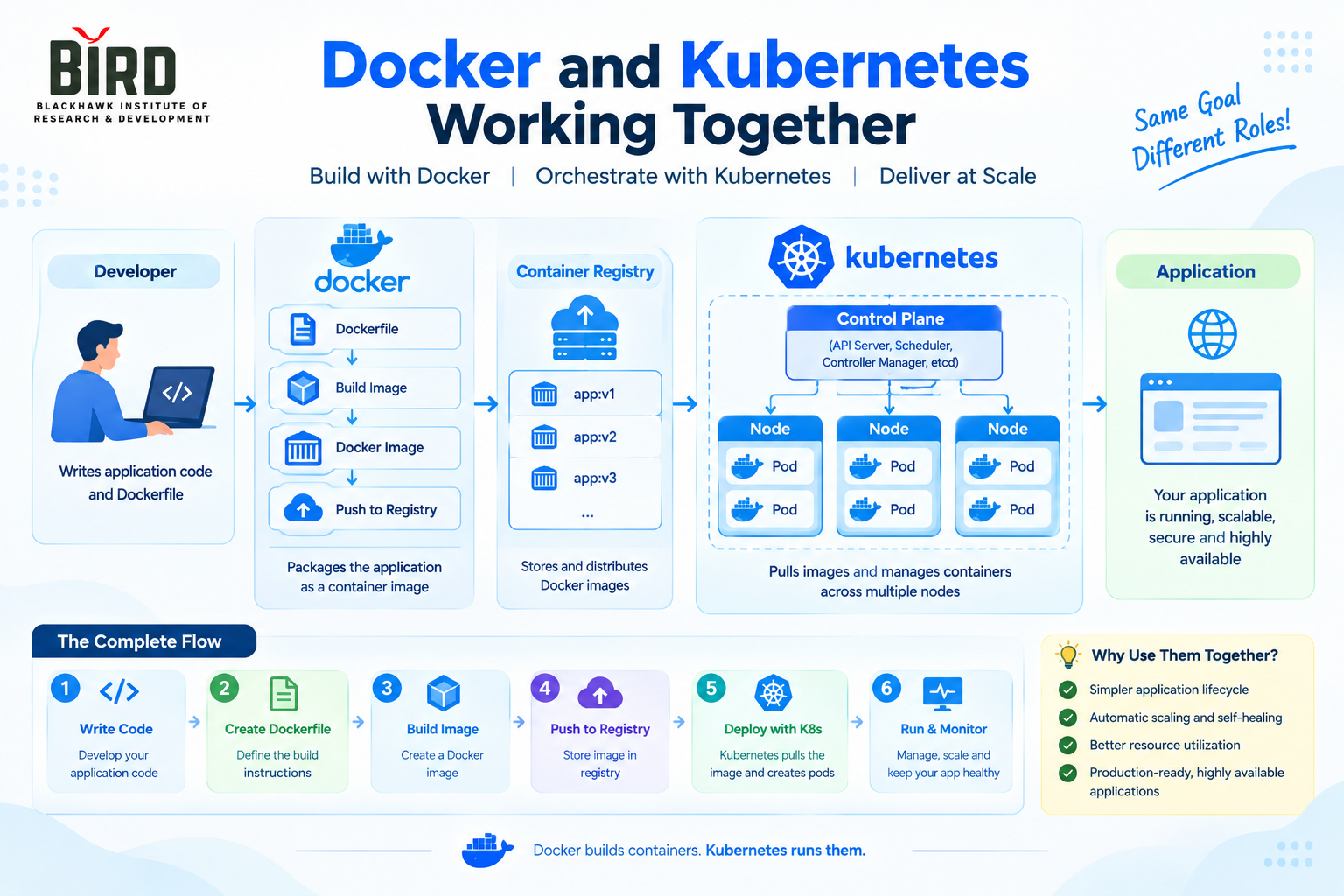
Yes. Docker and Kubernetes can be part of the same application delivery workflow.
A common workflow looks like this:
- A developer writes application code.
- A Dockerfile is created.
- A Docker image is built.
- The image is pushed to a container registry.
- Kubernetes pulls the required image.
- Kubernetes creates Pods to run the application.
- Kubernetes manages replicas, networking, updates, and application availability.
Real-World Example
Imagine an online application consisting of three components:
- Frontend application
- Backend API
- Database
Each component can be packaged and deployed as a containerized workload.
For a small development environment, you might run containers directly using Docker.
As the application grows, you may need multiple replicas, automated deployment, service discovery, health checks, rolling updates, and workload scheduling across multiple machines.
A Kubernetes cluster can provide orchestration for these requirements.
Docker vs Kubernetes: When Should You Use Docker?
Docker can be useful when you need to:
- Build container images.
- Package applications with their dependencies.
- Run containers locally.
- Create reproducible development environments.
- Test applications in isolated environments.
- Build container images for CI/CD pipelines.
When Should You Use Kubernetes?
Kubernetes becomes particularly useful when you need to manage containerized workloads across a cluster and require features such as:
- Multiple application replicas
- Automated scheduling
- Service discovery
- Load balancing
- Rolling deployments
- Workload recovery
- Cluster-level management
- Automated scaling
Docker vs Kubernetes for DevOps Engineers
For a DevOps engineer, learning only one of these technologies may not provide the complete containerization picture.
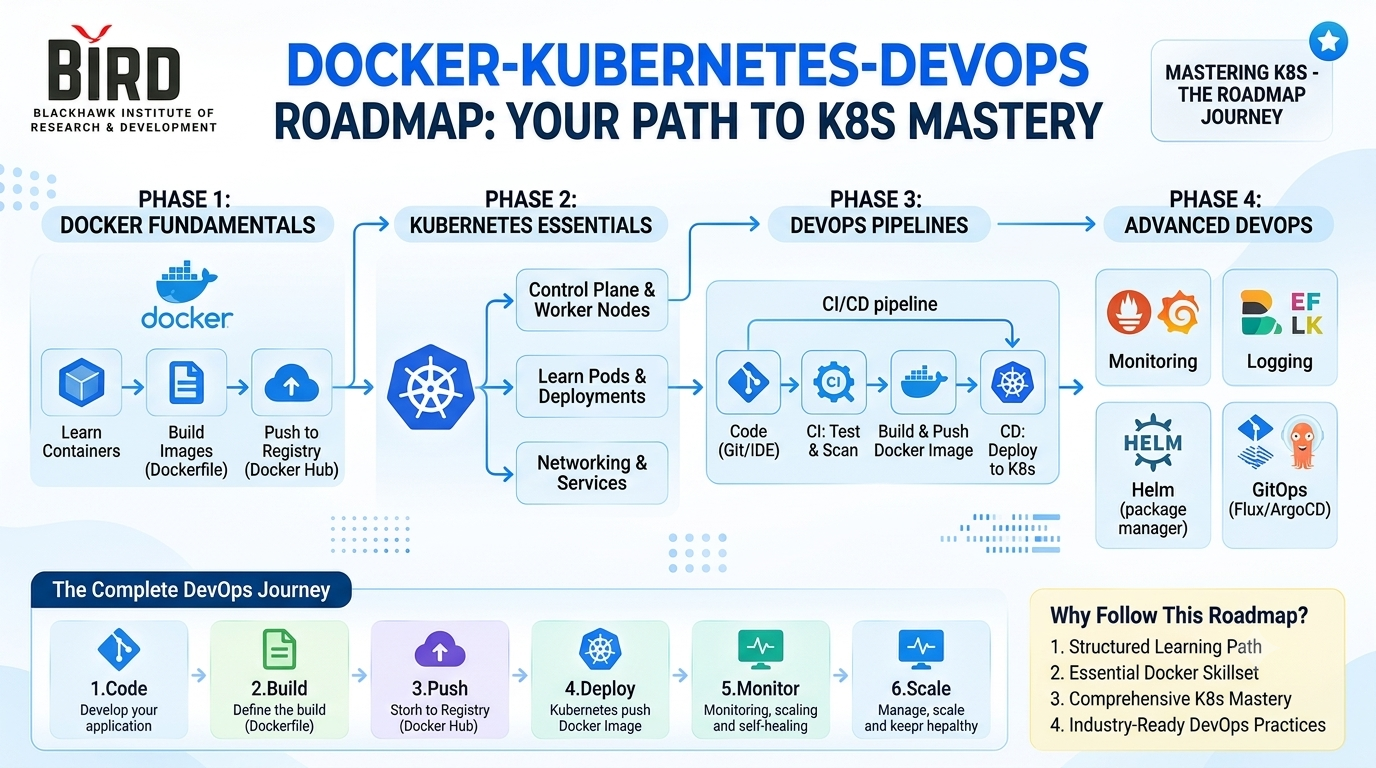
A practical learning path is to understand Docker fundamentals first and then learn Kubernetes orchestration.
A typical progression can be:
- Linux fundamentals
- Git and version control
- Docker fundamentals
- Dockerfiles and image management
- Container networking and storage
- Container registries
- Kubernetes architecture
- Pods, Deployments, and Services
- Kubernetes networking and storage
- Scaling and rolling deployments
- CI/CD integration
- Monitoring and troubleshooting
Common Docker and Kubernetes Interview Questions
1. What is Docker?
Docker is a containerization platform used to build, package, distribute, and run applications in containers.
2. What is Kubernetes?
Kubernetes is an open-source container orchestration platform used to automate the deployment, scaling, networking, and management of containerized workloads.
3. What is the difference between a Docker image and a container?
A Docker image is a packaged template, while a container is a running instance created from an image.
4. What is a Kubernetes Pod?
A Pod is the smallest deployable unit in Kubernetes and can contain one or more containers.
5. Can Kubernetes run without Docker?
Modern Kubernetes does not require Docker Engine specifically. Kubernetes uses a container runtime through the Container Runtime Interface (CRI), and commonly used runtimes include containerd and CRI-O.
6. What is Docker Compose?
Docker Compose is a tool for defining and running multi-container applications using a configuration file.
7. What is a Kubernetes Service?
A Kubernetes Service provides a stable network endpoint for accessing a group of Pods.
Docker vs Kubernetes: Key Takeaways
Docker and Kubernetes are important technologies in the container ecosystem, but they serve different primary purposes.
- Docker: Build, package, and run containerized applications.
- Kubernetes: Orchestrate and manage containerized workloads across clusters.
- Docker image: A packaged application environment.
- Container: A running instance of an image.
- Pod: The basic deployable unit in Kubernetes.
- Cluster: A group of machines managed by Kubernetes.
Understanding the difference between Docker and Kubernetes is an important step for anyone learning DevOps, cloud computing, SRE, or container orchestration.

Learn Docker and Kubernetes with Practical DevOps Training
Want to build practical DevOps skills? Learn Linux, Git, Docker, Kubernetes, AWS, CI/CD, monitoring, automation, and real-world deployment concepts through hands-on projects.
Want hands-on training? Join our DevOps, Data Analytics, AI, SQL, Linux, or Power BI courses at BIRD with live projects, interview preparation, and placement assistance.